Overview
Problem
Onboarding for Wonderkind Inspire relies heavily on calls and manual support, and it takes about 42 days before a client can use the platform independently. Clients cannot start important tasks like XML mapping until they finish onboarding.
Outcome
We designed a product-led onboarding flow that gives clients earlier access: a centralized Job Library, in-tool XML mapping with validation, and simplified asset management. These changes reduce errors and speed up first use of the platform.
Client
Wonderkind
Recruitment SaaS that transforms static job descriptions into engaging image and video ads, distributed at scale across social platforms.
Info
Role
Product Designer (research → IA/flows → prototypes → testing)
Team
PM, Product Owner, Head of Product, Backend Dev, Partner Success & Onboarding collaborators.
Timeline
6 months
understanding the problem
Why are we doing this?
1
Reduce time-to-value
Onboarding takes ~42 days and requires multiple handoffs (BD → Onboarding → Partner Success → Support).
2
Make self-serve possible
Clients can’t progress on their own; tasks like XML mapping are locked until onboarding is done.
3
Build trust & clarity
Users don’t see where their uploaded data goes, which creates confusion from the very first step.
data & metrics
Understanding the current experience
Onboarding to Wonderkind Inspire is more than training—it shapes the client’s first impression. At the moment, the process is slow and heavily manual, which pushes value out and can weaken trust.
42 days
Average time before a client can use the platform independently.
4 out of 5
XML mapping attempts include mistakes and require manual correction.
100%
Every new client must go through onboarding calls before they can use the product.
Support
Tutorials and chat are only available after sign-in.
hypothesis
By simplifying the first-run journey (clear entry point, visible data, shorter steps) and teaching in context (tooltips, micro-videos, prompts), users will onboard faster, rely less on support, and feel more confident in the process.
Key Opportunities
Overview of the previous experience
Interviews and flow review showed that onboarding feels slow and unclear. Clients aren’t sure where to start, data isn’t visible right away, and important actions are hidden. This creates friction and increases reliance on support.
1
Where do I start?
First steps aren’t obvious (e.g., choose a data source → create a job list). Users need clearer guidance and a visible sense of progress.
2
Make data visible
After uploading XML, users can’t see where it ends up or how it connects to later steps. Showing this immediately would reduce questions and confusion.
3
Simplify asset management
Right now, filters and actions are scattered. Let people edit items in place and use clear filters directly in the job list to make management faster.
4
Map XML in-product
Field mapping is complex and error-prone. A visual, guided mapping flow would cut mistakes and reduce support load.
Comparative Analysis
Identifying opportunities
Looking at competitors, it was clear that:
1. Most allow a trial sign-up rather than gating everything behind sales.
2. Many surface help (docs, academies, chat) before sign-in.
3. Several guide users through setup steps directly in the product, instead of relying only on calls.
Iteration 1
Job Library & Information Architecture
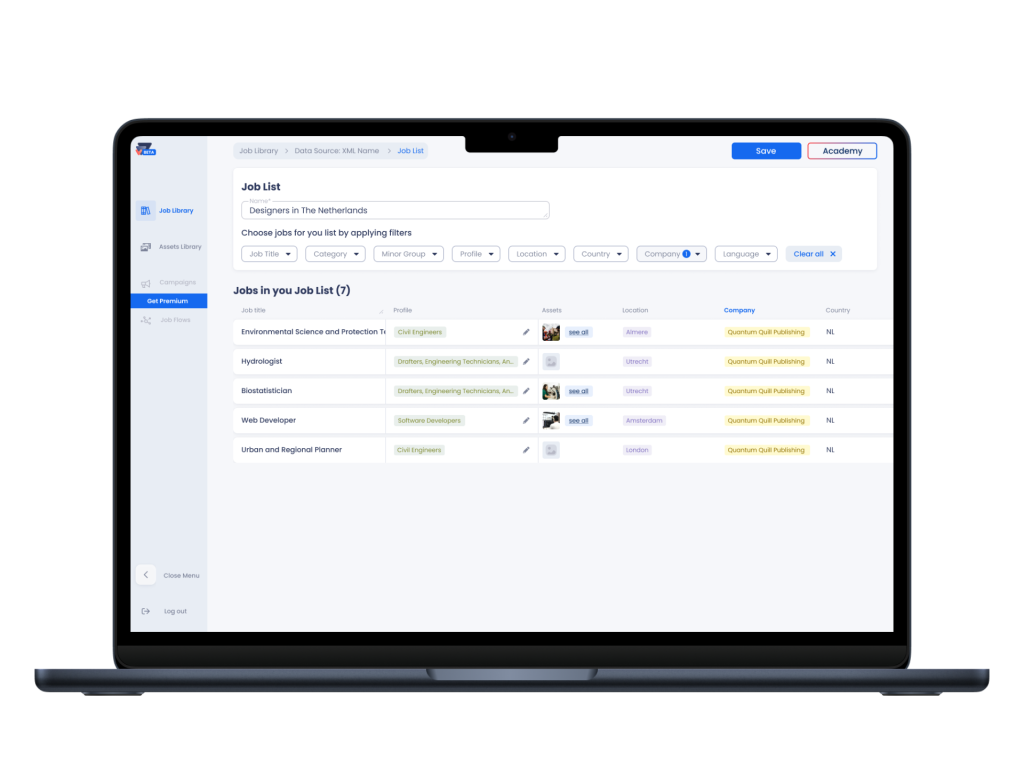
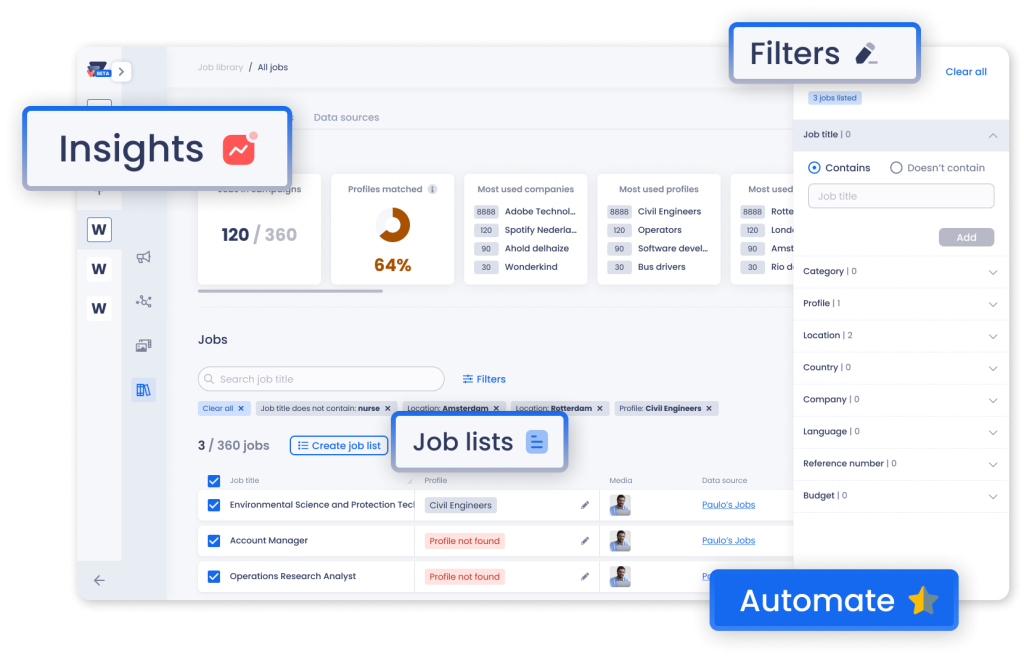
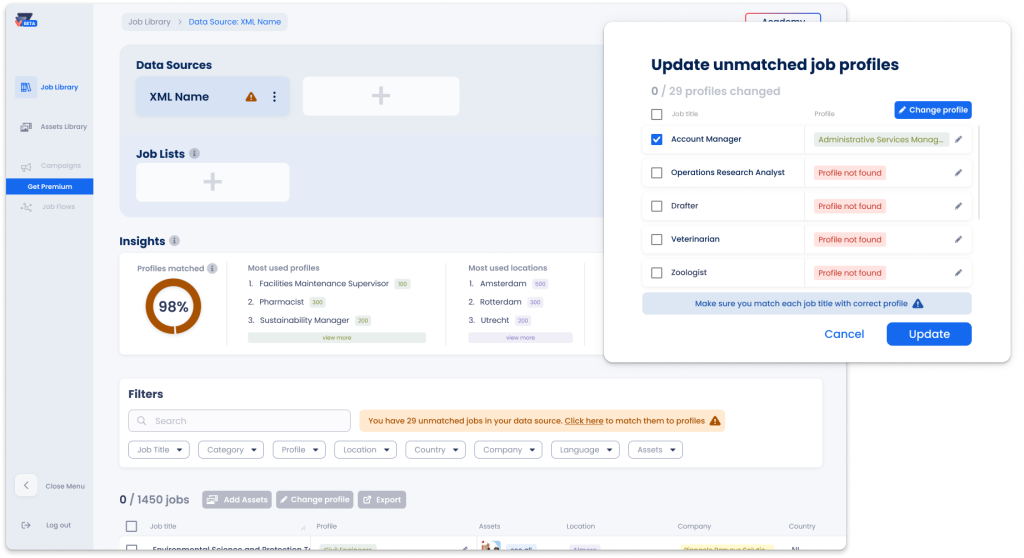
We introduced a centralized Job Library that connects data sources with job lists in one place. The hierarchy was clarified, filters were added, and progress cues helped users understand where they were in the flow.
Iteration 2
XML Mapping (In-product)
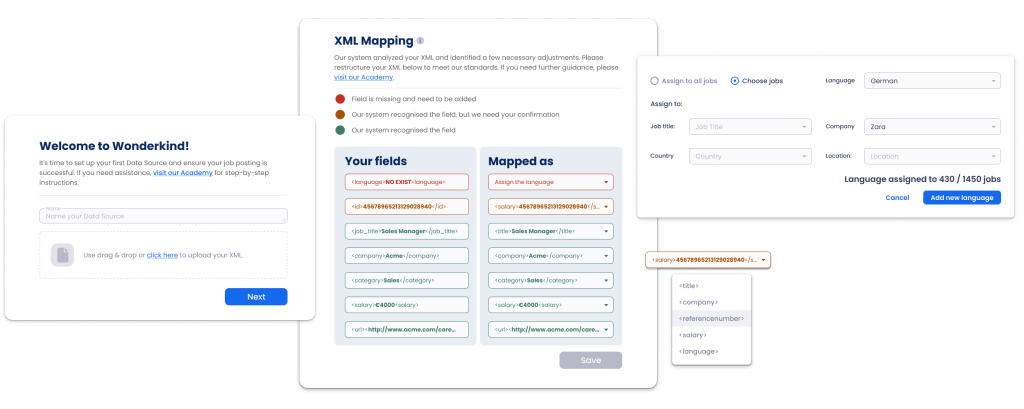
We built an in-tool XML mapping flow with visual guidance and validation. Labels and copy were refined through a survey, exceptions were surfaced earlier, and users can only save once all fields are correctly mapped.
Iteration 3
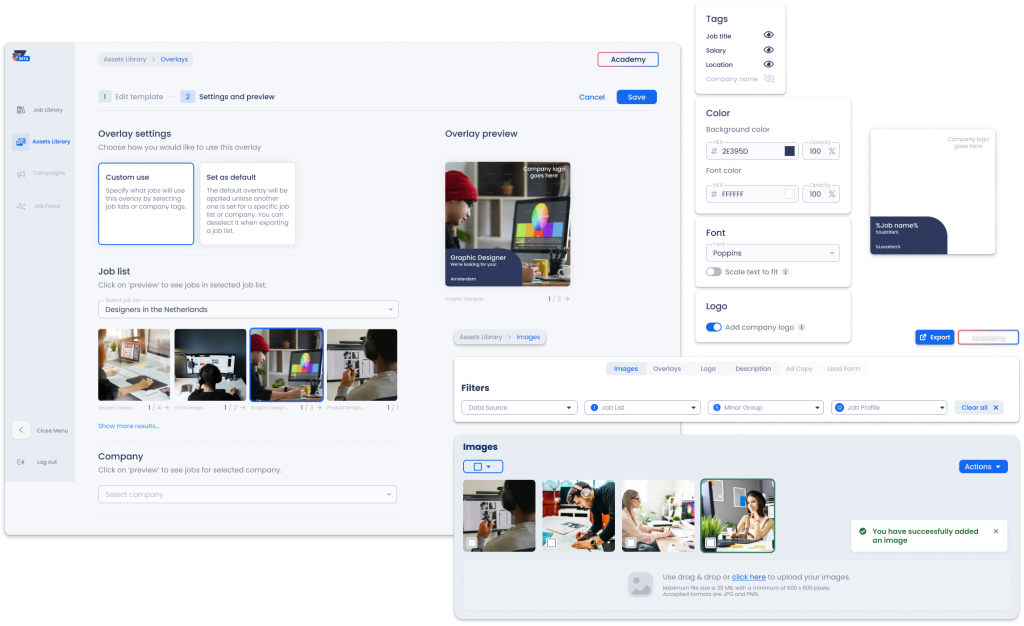
Assets Library
We made the Assets Library easier to use with clearer filters and quick management options right from the job list. Recruiters can now preview images with an overlay, so they see creatives in context without having to click around.
Validation
Usability testing
with 10 participants showed that unmatched profiles were easier to update after reworking the mechanics, a new hint guided users to choose a data source first, and export became easier to find.
Copy review
with 20 participants helped standardize labels, filter text, and action buttons, making the interface clearer.
XML mapping test
with 5 participants led to a better step order, the addition of “Assign Language,” and gating save until all fields were complete.
impact
Evaluating our results
To measure the effect of the new design, we tracked KPIs around onboarding speed, error rates, and independence. These gave us clear signals of where the changes improved the experience.
Time-to-first job list
Average time from sign-up to creating a first job list decreased from 42 days to 14 days. The new Job Library and progress cues helped users move forward much faster.
4 out of 5
Error rates during XML mapping dropped from 80% of attempts to 25%. The guided in-product flow with validation reduced mistakes and the need for manual corrections.
Export discoverability
Successful exports from the assets flow increased by +20% after adding clearer entry points. This shows that export is easier to find and complete within the new design.
Next steps
What's next?
After we delivered the validated concept and specs, the team planned to ship the Job Library, in-product XML mapping , and the Assets Library improvements first.
We outlined post-launch KPIs for the product team to track: time-to-first job list, XML mapping completion rate/time, the share of self-serve vs assisted onboarding, and export discovery/usage.
For the longer term, we recommended exploring direct XML export to job boards to reduce manual work and deliver earlier value.
Retrospective
What I learned along the way
Key lessons I’ll carry into future work to make projects faster, clearer, and more effective for both users and my team.
Keep it simple
The best solution is often the smallest. Start with the clearest path to value and ship the tiniest change that proves it.
Stay in scope
It’s easy for projects to grow once you start. Setting clear boundaries early helps keep things focused and avoids delays.
Design the first step
If people don’t know what to do first, nothing else matters. Make the initial action obvious and low-effort.
What matter
Agree on a few KPIs before you design. Use them to guide decisions, validate changes, and know when to move on.